Understanding Mixers
A Simple Guide for Event Planners
You’ve got the speakers. You’ve got the microphones. Someone’s bringing a laptop with the playlist.
So why would you need an audio mixer as well?
Because getting sound out of a speaker is one thing. Making sure everything sounds clear, balanced and professional is another.
Whether you’re organising a wedding, business conference, live performance or community event, an audio mixer can be the difference between everything running smoothly and someone frantically adjusting the volume halfway through a speech.
And despite all those intimidating knobs and buttons, mixers are actually much simpler than they look. Here’s what they do, how to use one and how to choose the right mixer for your event.
What Is an Audio Mixer?
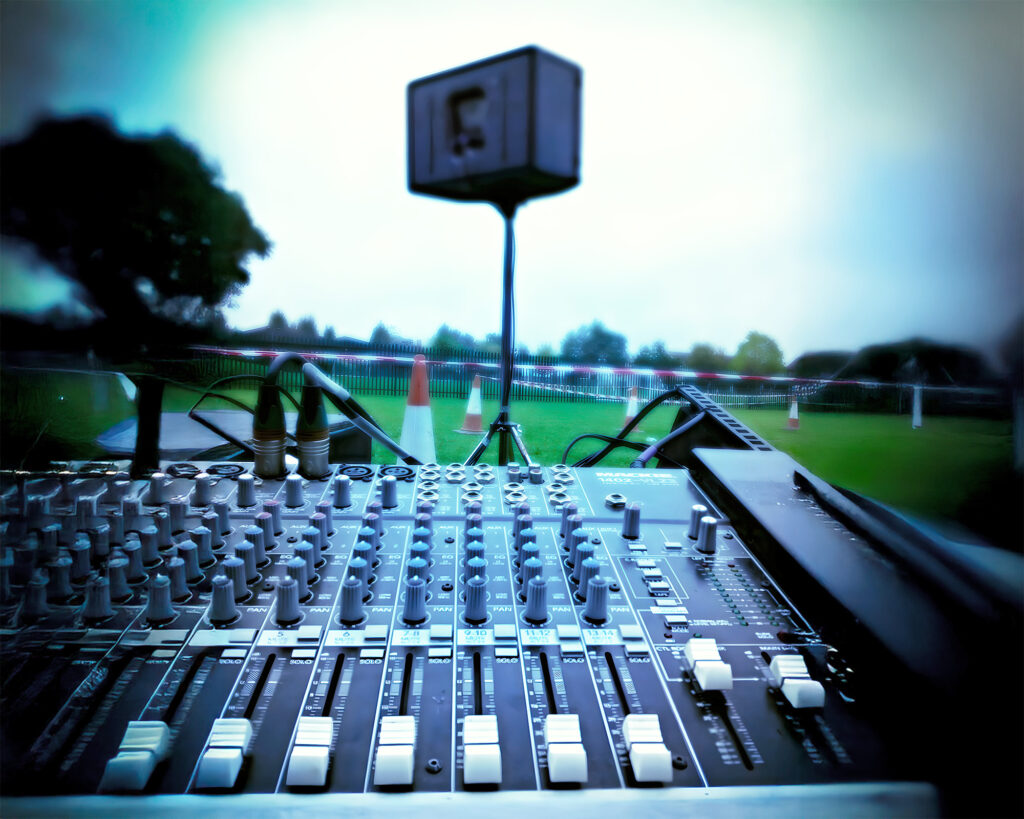
An audio mixer is a device that combines and controls sound from multiple sources before sending it to your speakers or recording equipment.
Think of it as the control centre for your event’s sound. Imagine you’re hosting an awards evening with two microphones, a laptop playing background music and a video presentation.
Without a suitable mixer, managing those different audio sources can quickly become awkward.
With one, you can control each source independently.
You can turn down the background music when someone starts speaking, adjust a quiet microphone without affecting the other one and balance everything so the audience hears what they’re supposed to hear.
That’s the real benefit of an audio mixer. Not making things complicated, but giving you control. And you don’t need to be a professional sound engineer to understand the basics.
How Does an Audio Mixer Work?
At its simplest, a mixer does three things:
Receives audio
from microphones, laptops, instruments and other sources.
Lets you adjust the sound
using controls for volume, gain, EQ and sometimes effects.
Sends the combined audio
to your speakers or other connected equipment.
Each sound source usually has its own channel, allowing you to adjust it without changing everything else.
For example, during a conference you might have:
Mixer channel
Connected equipment
Channel 1
Presenter microphone
Channel 2
Second microphone
Channels 3–4
Laptop presentation audio
Channels 5–6
Background music
That’s a simplified example. The exact connections depend on the mixer, and stereo sources may use two channels or a dedicated stereo input.
The important thing is that everything can be managed from one place.
What Do All Those Knobs Actually Do?
You don’t need to understand every button on a mixer to use one confidently. Start with these five.
Gain
The incoming signal level
Gain adjusts how strongly the mixer receives the audio from a particular source. Too little and the signal may be unnecessarily quiet. Too much and it can distort before you’ve even turned up the main volume. Getting the gain right is one of the most useful things you can learn.
Channel volume
How loud each source is in the mix
This is what you’ll adjust most often during an event.
If the microphone is too quiet compared with the background music, you can increase its channel level or reduce the music.
EQ
Shaping the sound
EQ stands for equalisation. It lets you adjust different frequency ranges.
For example, reducing excessive low frequencies can help tidy up a muddy-sounding speech. You don’t need to make dramatic adjustments. Often, small changes work best.
Main output
The overall volume
The main output controls the combined signal being sent from the mixer.
Once the individual channels are balanced, you can use this to adjust the overall output level, while keeping an eye on the mixer’s meters and the connected speaker system.
Mute
your best friend during an event
A mute button lets you silence a channel without disconnecting anything. It’s particularly useful when microphones aren’t being used or when you need to switch between presenters. Not every small mixer has dedicated mute buttons, so it’s worth checking before hiring.
Do You Actually Need a Mixer for Your Event?
Not every event needs a separate mixer. If you’ve got a single microphone plugged into a powered speaker with suitable built-in controls, you might already have everything you need.
But once you start introducing multiple microphones, music and presentation audio, a mixer becomes much more useful. Here’s a rough guide:
Event type
Mixer recommendation
Small speech with one microphone
Often optional
Wedding speeches with music
Small mixer
Corporate conference with several microphones
Multi-channel mixer
Acoustic performance
Mixer with enough microphone/instrument inputs
Live band
Larger mixer, often with an engineer
Community event with announcements and music
Small to medium mixer
A useful rule
Count everything you need to connect before choosing your mixer.
And don’t forget that a laptop, phone or stereo music player can require more than one input, depending on the connections.
Three Types of Mixers Worth Knowing About
There are plenty of audio mixers on the market, but for most small and medium-sized events, three categories cover what you need.
1. Compact Line Mixers - Keeping Things Simple
Sometimes you just need to combine a few audio sources without taking up half a table.
A compact line mixer such as the Behringer Micromix MX400 is designed for that job.
It’s small, straightforward and particularly useful when you have several compatible line-level sources.
For example, you might want to combine audio from a couple of playback devices into one output.
The important distinction is that the MX400 isn’t a conventional microphone mixer. Its inputs are intended for mono line-level signals, so you shouldn’t expect to connect ordinary microphones directly and achieve the same results as a full mixer with microphone preamps.
Best for
Small, simple line-level audio setups where space is limited.
Not ideal for
Multiple microphones, detailed sound adjustments or anything requiring independent stereo channels.
2. Analogue Mixers - The All-Rounders
For most weddings, speeches and smaller events, this is where we’d start looking. Analogue mixers use physical controls, so you can see what you’re adjusting without scrolling through menus.
Two examples from JET’s equipment range are the Yamaha MG10 and Behringer Xenyx 1204USB.
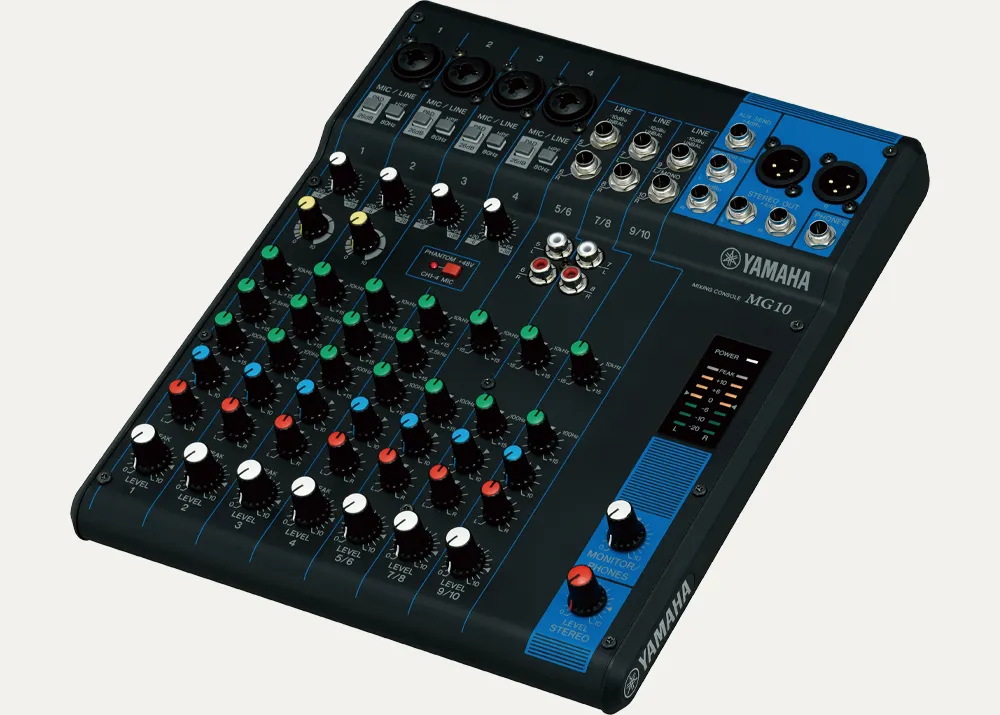
Yamaha MG10
A practical choice for events with several audio sources. It offers multiple microphone inputs alongside additional line-level connections, making it useful for presentations, speeches and background music. Its straightforward physical controls make it approachable for anyone who needs to manage a relatively simple event.
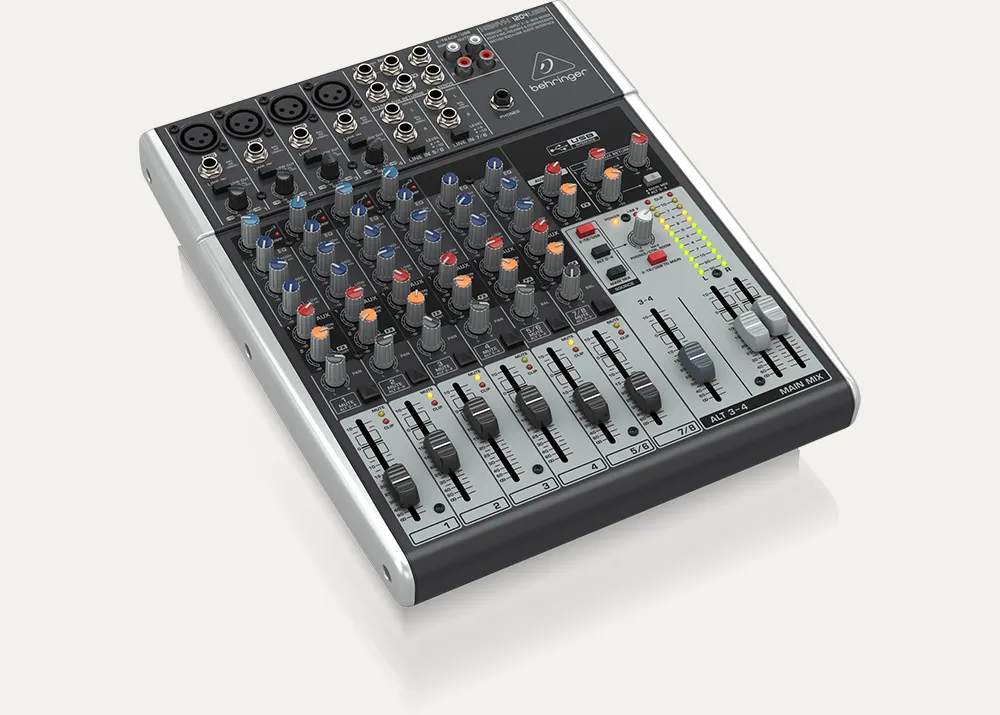
Behringer Xenyx 1204USB
A low cost option for events requiring multiple microphones and music sources. It provides individual channel controls, EQ and additional routing options, alongside USB audio connectivity.
It’s particularly useful when you need a little more control than a very basic mixer offers.
Best for
Weddings, corporate presentations, school events, speeches and smaller performances.
Our Advice
Don’t hire a mixer just because it looks the fanciest. Choose one with the connections and controls your event genuinely needs.
3. Digital Mixers - For More Complex Events
Digital mixers take things further.
Instead of relying entirely on physical controls, they can offer features such as stored settings, more detailed processing, flexible routing and remote control.
A mixer such as the Behringer X32 Compact is designed for more involved sound setups.
It’s the kind of equipment you might encounter at larger conferences, multi-microphone productions and live performances.
Digital mixers can be incredibly capable, but they’re not automatically the right choice for a small event.
If you’re running two microphones and a Spotify playlist, you probably don’t need something designed to manage an entire band.
Best for
Larger or more technically demanding events, particularly where an experienced operator is available.
Our Advice
If you’re new to mixers and unless you really need it, choose one of the other types. These types take a while to learn and can be more complicated than it needs to be.
Getting Audio from Your Laptop or Phone into a Mixer
Here’s something people often forget until they’re standing in front of a mixer.
How are you actually getting the music into it?
Your laptop might have a 3.5mm headphone socket, a USB-C port or only digital audio outputs.
Your mixer might have 6.35mm jack inputs, RCA connections or USB audio functionality.
Those connections aren’t necessarily interchangeable.
Check Your Connections Before the Event
If your laptop has a standard 3.5mm headphone output and your mixer accepts appropriate line-level inputs, a correctly wired 3.5mm-to-dual-6.35mm audio cable may be all you need.
For laptops or phones without a headphone socket, a compatible USB-C audio adaptor might also be necessary.
UGREEN produces audio cables and adaptors worth considering for straightforward setups, but always check the connector types and your equipment’s requirements before ordering.
Useful accessory: UGREEN 3.5mm to dual 6.35mm audio cable
It’s one of those inexpensive accessories that’s easy to overlook until you realise the laptop and mixer don’t have matching connections.
Just make sure you’re using the appropriate line inputs, rather than plugging a stereo headphone signal into an unsuitable microphone input.
For longer cable runs or more demanding environments, a suitable DI box or other audio interface may be preferable.
Four Common Mixer Mistakes (And How to Avoid Them)
Even a great mixer can’t rescue a setup that’s been connected or adjusted incorrectly.
Fortunately, most beginner mistakes are easy to prevent.
1. Turning Everything Up to Maximum
More volume doesn’t always mean better sound.
If your input gain is too high, the signal can distort even when the speaker volume seems reasonable.
Start with sensible levels, check your meters and increase the output gradually.
If something sounds harsh or distorted, don’t automatically turn up another control to compensate.
Find out where the problem is coming from.
2. Forgetting to Soundcheck Every Microphone
Testing one microphone doesn’t mean the whole system is ready.
If you’re using several microphones, check each one individually.
Have someone speak into them at a realistic volume, preferably from the position they’ll be using during the event.
If one microphone sounds significantly quieter than another, adjust the relevant channel rather than constantly changing the main output.
You can also read our guide to wired and wireless microphones if you’re still deciding which type your event needs.
3. Placing Speakers Behind the Microphones
That horrible high-pitched squeal you sometimes hear is called feedback.
It happens when sound from a speaker is picked up by a microphone, amplified and sent back through the speaker repeatedly.
Speaker and microphone positioning makes a big difference.
As a starting point, keep your main speakers in front of the microphone positions, directed towards the audience rather than back towards the performers or presenters.
The exact positioning depends on the microphone’s pickup pattern and the room.
Don’t rely on turning everything down to solve a problem that could be avoided with better placement.
4. Having No Way to Monitor the Sound
Here’s a simple scenario.
The audience says the music sounds distorted, but from your position beside the mixer, you can’t tell what’s wrong.
A pair of wired headphones can help you check individual channels when your mixer has suitable monitoring facilities.
Something like the Audio-Technica ATH-M20x wired monitoring headphones is a sensible option to investigate if you’re regularly managing audio yourself.
Useful accessory: Audio-Technica ATH-M20x wired headphones
They won’t replace listening to the actual speakers in the room, but they give you another way to identify problems before the audience notices.
Setting Up an Audio Mixer: A Simple Checklist
You don’t need an elaborate technical procedure for a small event, but taking a few minutes to work through the basics can make a substantial difference.
Position the mixer somewhere accessible. You’ll want to reach the controls without climbing over equipment or disrupting guests.
Connect your audio sources. Plug microphones, music players and other devices into the appropriate inputs.
Connect the mixer to your sound system. Check that the mixer outputs are compatible with the connected equipment.
Start with the output levels down. Bring levels up gradually and safely after confirming everything is connected.
Set the gain for each source. Test at realistic speaking or playback levels and watch for clipping.
Balance the channels. Make sure speech is clear and music doesn’t overpower it.
Test the entire system. Walk around the audience area and check the sound from different positions.
If you’re using a mixer regularly, keeping your cables organised is worth the effort.
Reusable hook-and-loop cable ties, such as VELCRO ONE-WRAP, are handy for keeping equipment organised during transport and setup.
Useful accessory: VELCRO ONE-WRAP reusable cable ties
Just remember that cable ties help with organisation; they aren’t a substitute for suitable cable ramps or covers wherever cables cross pedestrian routes.
What Size Mixer Do You Need?
The number of microphones and other sources is more important than the physical size of the event.
A wedding with 150 guests might only need a couple of microphones and one music source.
Meanwhile, a smaller panel discussion with six speakers could require considerably more inputs.
Before deciding, ask yourself:
How many microphones will be used at the same time?
Will music or presentation audio need to play alongside the microphones?
Do you need to connect instruments?
Will you require separate speaker or monitor mixes?
Who will be operating the equipment?
One particularly useful tip is to leave yourself a little spare capacity.
If you expect to use four inputs, a mixer with additional available channels gives you flexibility if plans change.
But don’t mistake the number in a mixer’s name for its microphone count. A mixer described as having ten or twelve channels may have fewer dedicated microphone inputs.
Always check the specifications.
Hiring a Mixer vs Buying One
If you’re planning a single event, buying a mixer outright doesn’t always make sense.
A mixer is only one part of the setup. You’ll also need compatible microphones, cables, speakers and potentially somebody who knows how to operate everything.
Hiring can be a more practical option because you can choose equipment suited to the particular event without having to store and maintain it afterwards.
For regular performers, venues or organisations that use the same setup every week, buying might be worthwhile.
For the occasional conference, wedding or community event, hiring is often the easier route.
At JET Event Hire, we can help with everything from compact mixer setups to larger audio requirements.
And if you’re not entirely sure how everything connects together, that’s exactly the sort of question worth asking before the event rather than on the day.
Mixer FAQs
Do I need an audio mixer for just one microphone?
Not necessarily. If your powered speaker has a compatible microphone input and suitable volume controls, you may be able to connect directly. A mixer becomes more useful when you’re managing several microphones or additional audio sources.
Can I connect my phone or laptop to an audio mixer?
Yes, provided you have the appropriate connections. Depending on your devices, this could involve an analogue audio cable, a compatible adaptor or a USB audio connection. Check your mixer’s input specifications first.
What's the difference between an analogue and digital mixer?
Analogue mixers generally provide direct physical controls for the main functions. Digital mixers offer more advanced processing, routing and often stored settings. Neither is automatically better; the right choice depends on the complexity of your setup and who’s operating it.
Will an audio mixer make my speakers louder?
A mixer lets you control and combine audio signals, but it doesn’t automatically increase the power of your speakers. Your overall sound output depends on your amplification, speakers, signal levels and system configuration.
Final Thoughts: Don't Overcomplicate Your Sound
A good audio mixer should make your event easier to manage, not give you another thing to worry about.
For a simple speech or presentation, a compact analogue mixer may be all you need.
For events involving several microphones, music and performances, having more channels and control can make a real difference.
And for larger productions, a digital mixer with an experienced operator can bring everything together.
The best mixer isn’t the biggest or most expensive. It’s the one that gives you the right amount of control for your event.
Need Sound Equipment for Your Event?
Whether you’re organising a corporate presentation, wedding, live performance or community gathering, JET Event Hire can help you find the right setup.
From straightforward microphone and mixer hire to complete PA systems, we’ll help you work out what your event actually needs.
Explore our sound hire equipment or get in touch to tell us what you’re planning.
No complicated technical jargon required. Just good sound, sorted.

Posted By
Jack
JET Event Hire

Affiliate disclosure: This article contains paid links. We earn a small commission from qualifying purchases at no extra cost to you. As an Amazon Associate I earn from qualifying purchases.